klipper增加摄像头
给上位机增加一个摄像头就可以方便我们后续检查打印情况,而不是一次次的跑过去看。
安装crowsnest
首先进入到上位机后台,切换到klipper用户,使用 ./kiauh/kiauh.sh,进入脚本界面。
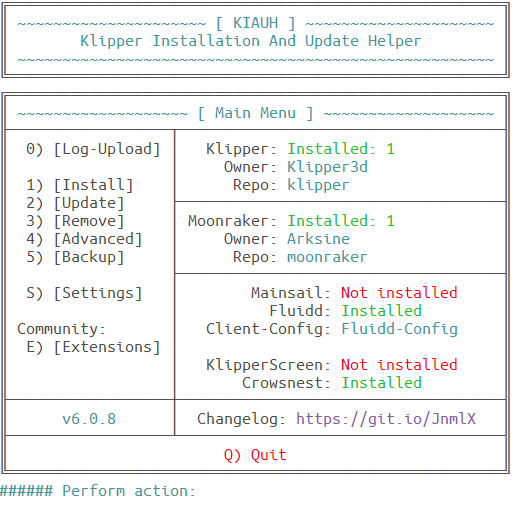
根据命令安装Crowsnest即可,如果你一帆风顺,那么这边就结束了。如果有问题看下面:
很多人给klipper安装crowsnest的时候,都会提示软件源错误。
Thank you for installing crowsnest 😉
This will take a while …
Please reboot after the installation has finished.
Running apt-get update first …
Hit:1 https://mirrors.ustc.edu.cn/debian bullseye InRelease
Hit:2 https://mirrors.ustc.edu.cn/debian bullseye-updates InRelease
Ign:3 https://mirrors.ustc.edu.cn/debian bullseye-backports InRelease
Hit:4 https://mirrors.ustc.edu.cn/debian-security bullseye-security InRelease
Err:5 https://mirrors.ustc.edu.cn/debian bullseye-backports Release
404 Not Found 【IP: 202.141.176.110 443】
Reading package lists…
E: The repository ‘https://mirrors.ustc.edu.cn/debian bullseye-backports Release’ no longer has a Release file.
Running apt-get update first … 【FAILED】
Something went wrong!
Please copy the latest output, head over to
https://discord.gg/mainsail
and open a ticket in #supportforum…
make: *** 【Makefile:19: install】 Error 1
这种一般是你的系统很老,或者就是像我这样不是标准的debian系统,是armdebian,有些固件或者软件是被锁定的。
这时候你就要修改软件源:
sudo nano /etc/apt/sources.list
这里用的是nano打开,一般都有,如果提示错误,可以使用apt install nano进行安装。我下面提供的是debian 11 bullseye的清华源,这个需要根据你自己的系统进行调整。
deb https://mirrors.tuna.tsinghua.edu.cn/debian/ bullseye main contrib non-free
deb https://mirrors.tuna.tsinghua.edu.cn/debian/ bullseye-updates main contrib non-free
deb https://mirrors.tuna.tsinghua.edu.cn/debian-security bullseye-security main contrib non-free
使用ctrl+a全选,然后delete删除,ctrl+v粘贴,ctrl+o保存,回车确认,再使用ctrl+x退出。
注意:Armbian 还有一个专门的源在 /etc/apt/sources.list.d/armbian.list,也可以进去把里面的地址换成清华或中科大的镜像。
很多人改完之后发现还是不行就是因为这个。
安装完成之后,使用ls /dev/v4l/by-id/*可以找到一串摄像头代码,复制下来备用。
网页端增加配置
-
找到fluid的后台配置界面,会自动生成一个
crowsnest.conf的文件,修改divice这个位置,将上面找到的代码复制进去即可。
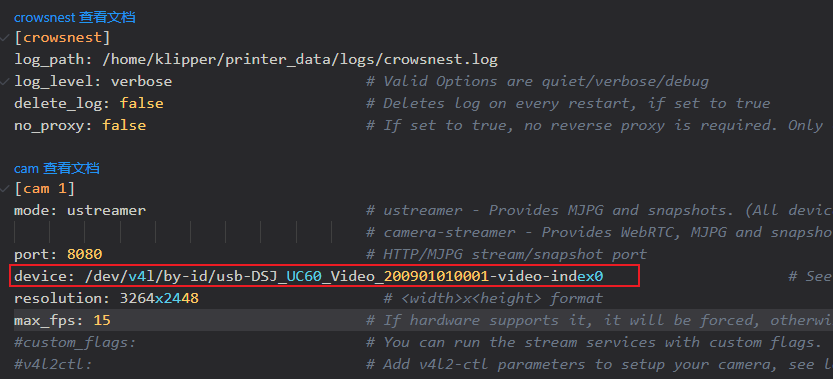
其他参数如果有需求也可以修改,包括分辨率和流之类的。
-
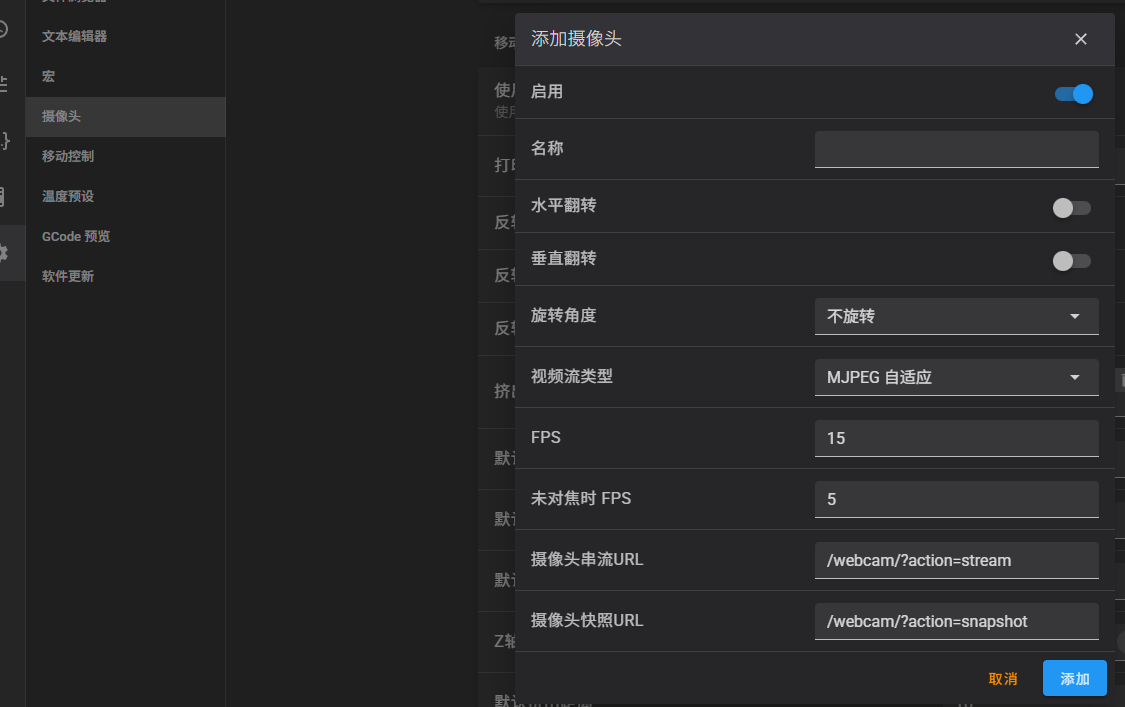
找到设置界面,新增一个摄像头,名称随意,其他的保持默认即可,有需求也可以调整。
-
重启机器,界面上的重启是没有效果的。
总结
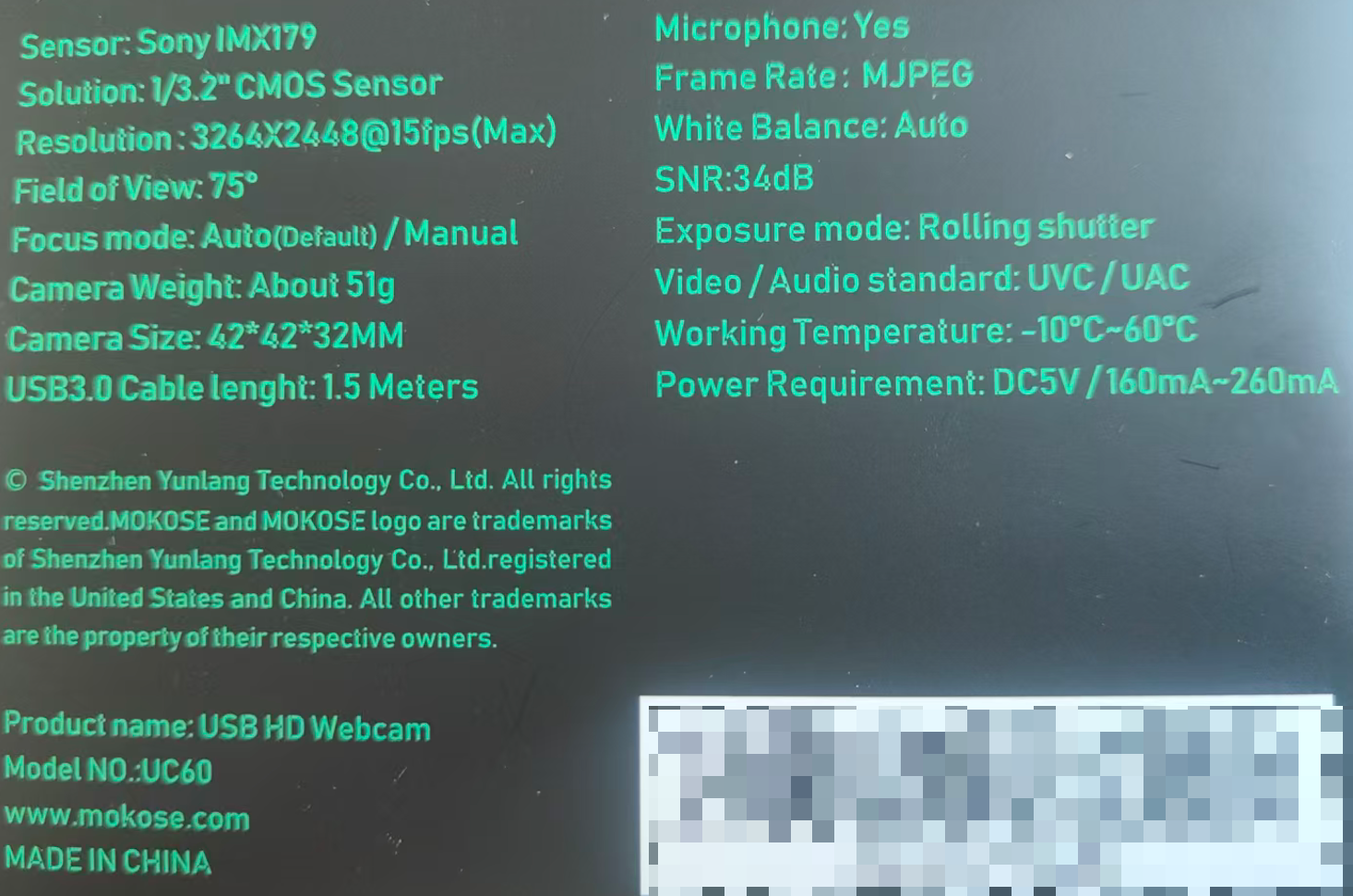
这样简单的设置就可以增加一个摄像头,后续可以考虑增加一个支架,让它一直盯着,也可以打印一个支架固定住,我买的这个摄像头50块,配置如下: